About PieceAlive
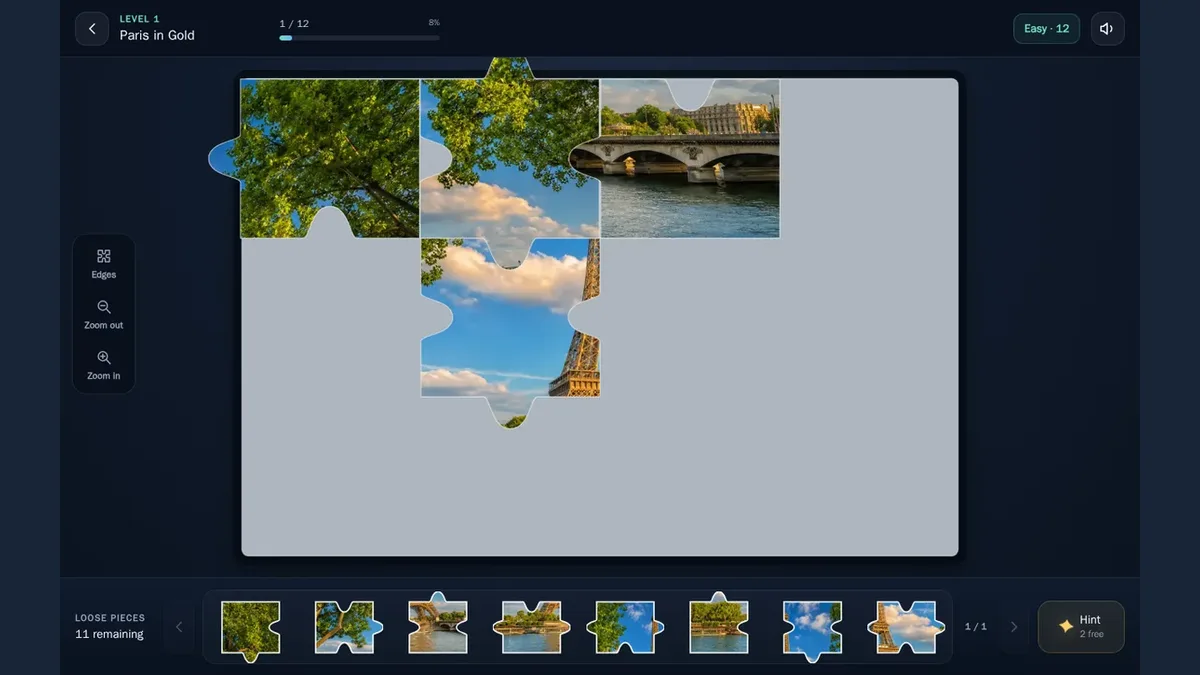
Drag a loose piece from the tray onto the gray board in PieceAlive. The opening puzzle is Paris in Gold, a twelve-piece scene with trees, sky and part of the Eiffel Tower. On desktop, a matched-piece counter and percentage sit above the board, while the tray shows how many pieces remain. Mouse dragging and touchscreen dragging both moved pieces in the tested layouts.
The desktop Hint button provided a clear way to check progress. After two manual drags left the counter at 0/12, clicking Hint placed a puzzle piece and changed the display to 1/12 and 8%. Free hints dropped from three to two, with eleven pieces left in the tray. A later mouse drag moved another piece but left that matched count unchanged. Moving a piece onto the board is therefore different from confirming a correct fit in these screenshots.
On the phone-sized screen, two touch drags brought tree and sky pieces onto adjacent positions near the board’s upper-left corner. Their correct fitting was not established. We tested this opening Easy puzzle and the desktop Hint response; puzzle completion, touchscreen Hint behavior, later scenes, zoom and the edge filter remain unverified.
Playtest screenshots
Swipe or scroll to see all 2
Why it's Chromebook-friendly
Native touch and mouse drags moved loose pieces onto the opening Paris board. After two desktop drags left0/12, Hint placed a puzzle piece and changed the count to1/12 and8%, reducing free hints to two. A later mouse drag left that count unchanged. Correct manual fitting and puzzle completion were not verified.
Controls
| Action | Desktop | Mobile |
|---|---|---|
| Move a loose puzzle piece | Drag a visible loose piece from the tray onto the board | Touch-drag a visible loose piece from the tray onto the board |
Having trouble? Report a problem. Reloading may reset your progress.